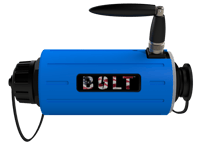
Get your Bolt up and running in minutes. Find hookup diagrams, software downloads, training resources, and everything you need to start capturing power quality data.
Need help? Support is available 24/7 at (800) 296-4120
Have a PQ question? Ask Merlin™—free.
Email or text us your toughest PQ questions and get answers backed by decades of PQ experience with Merlin™.
Whether you're new to power quality or a seasoned engineer, PMI offers training to help you get the most out of your equipment and deepen your expertise.
Green = initialized correctly. Orange = measurements don't match initial parameters, recheck connections. Purple = CTs inverted or on wrong phase. See the Quick Start Guide for the full LED reference.
Install PMI View and enable Bluetooth (BLE). Open the app, let it discover Bolts in range, select yours, and update firmware if prompted.
The Cell Bolt includes an internal SIM (PMI-supplied or customer-supplied) supporting LTE CAT 1 bis on Verizon bands 4 and 13. Contact PMI support for connectivity plan details.
The Bolt uses Bolt-specific Flex CTs (not the standard box-recorder style). It ships with a 3-channel 9" Bolt Flex CT and is also compatible with PMI's TLAR-S clamp-style current transformers. Standard Flex CTs and TLARs from other PMI recorders are not interchangeable. See the spec sheet for full measurement specs.