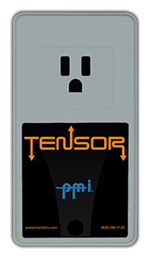

The Tensor is designed for indoor use with a standard 15-amp 120VAC receptacle. It's ideal for office equipment, lab gear, IT closets, refrigeration, and other single-outlet applications. Do not use outdoors or in wet locations (per the National Electrical Code).
The WiFi Tensor connects through your local network. The Cell Tensor uses an LTE modem and a network IP address assigned by the cell plan provider, so it works anywhere there's cellular coverage — no WiFi required. Both models stream data to PQ Canvass.
Yes. The Tensor's built-in receptacle can be switched on or off from any web browser through PQ Canvass. Useful for power-cycling remote equipment, scheduling loads, or responding to alerts without a site visit.
RMS voltage and current, real/apparent/reactive power, power factor, phase angle, harmonics to the 51st, transients, flicker, and ITIC/CBEMA events. It also tracks temperature, humidity, and barometric pressure — no external CTs or clamps needed. Current is sampled 256 times per cycle, same as voltage.
The Tensor keeps operating without input voltage for up to 5 minutes, so it can capture the event and send alerts during a brief outage. Once line voltage returns, it powers back up automatically and resumes recording.
Set adjustable voltage, current, and power thresholds in PQ Canvass or ProVision. When a threshold is crossed, the Tensor sends an instant email or SMS notification so you know about issues the moment they happen.
Need more help? Our Technical Support Team is available 24/7. Call (800) 296-4120, visit the Support Center, or browse our full training catalog.