---
title: Atom Enviromental Sensor — Setup Guide & Resources | PMI
description: Set up your PMI Atom wireless environmental sensor. Download the Atom iOS App, pair with a PMI recorder, and start monitoring temperature, humidity, and more.
---
[ Power Monitors](https://powermonitors.com)
- [Home](https://powermonitors.com)
- [Products](https://powermonitors.com/products)
- Library
Videos
[All](https://powermonitors.com/videos/) [Bolt Quality Tests](https://powermonitors.com/videos/?video_search=&video_topic=bolt-quality-tests) [Promotional Videos](https://powermonitors.com/videos/?video_search=&video_topic=promotional-videos) [Support Videos](https://powermonitors.com/videos/?video_search=&video_topic=support) [Power Quality Decoded](https://powermonitors.com/videos/?video_search=&video_topic=white-paper-walkthroughs)
White Papers
[All](https://powermonitors.com/whitepapers/) [Artificial Intelligence](https://powermonitors.com/whitepapers/?whitepaper_search=Merlin&whitepaper_topic=) [Case Studies](https://powermonitors.com/whitepapers/?whitepaper_topic=case-studies) Communications [Distributed Generation](https://powermonitors.com/whitepapers/?whitepaper_topic=distributed-generation) Products [Harmonics](https://powermonitors.com/whitepapers/?whitepaper_topic=harmonics) [IEEE Standards](https://powermonitors.com/whitepapers/?whitepaper_topic=ieee-standards) Power Quality Voltage
- Training
[All](https://info.powermonitors.com/training) [PDH Eligible Classes](https://powermonitors.com/product-category/classes/) [On-Site Training](https://powermonitors.com/on-site-training/) [Online Webinars](https://info.powermonitors.com/no-cost-class-schedule)
- [Support](https://powermonitors.com/support/)
- Our Company
[About Us](https://powermonitors.com/about-pmi/) [Contact](https://powermonitors.com/contact/) [Join Our Team!](https://info.powermonitors.com/join-pmi) [Receive our Newsletter](https://info.powermonitors.com/email-subscribe-page) [PQ Resources](https://info.powermonitors.com/power-quality-resources) [Power Quality Solutions](https://powermonitors.com/power-quality-solutions/) [Who We Serve](https://powermonitors.com/sales-representatives/)
- [Account](https://powermonitors.com/account/)
- [Cart](https://powermonitors.com/cart/)
Getting Started
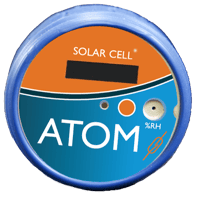
# Atom Setup Guide & Resources
Get your Atom wireless environmental sensor up and running in minutes. Pair with the Atom iOS App or a PMI recorder, place it where you need readings, and let it monitor temperature, humidity, pressure, light, door closure, and vibration — all on a 10-year battery.
[Get the Atom iOS App](https://apps.apple.com/us/app/pmi-atom/id6451215869)
Need help? Support is available 24/7 at (800) 296-4120

Have a PQ question? Ask Merlin™—free.
Email or text us your toughest PQ questions and get answers backed by decades of PQ experience with Merlin™.
Standard messaging/data rates may apply.
[Email Merlin™](mailto:askmerlin@powermonitors.com?subject=PQ%20Question%20for%20Merlin) [Text Merlin™](sms:+15403833144)
Quick Start — 4 Steps to First Reading
[Quickstart Guide](https://powermonitors.com/download/atom-quickstart-guide/?tmstv=1744751120)
1
### Wake the Atom
Hold the orange button 8–12 seconds to reboot, then press 5 times to enter Install Mode (2 white flashes)
### [2 Pair with the app or a hub Open the Atom iOS App and tap your Atom — or pair to a Bolt, Seeker, Guardian, or Tensor in PQ Canvass](https://apps.apple.com/us/app/pmi-atom/id6451215869)
3
### Place & monitor
Position the Atom where you need readings. Sensors record every minute with up to 1 year of on-board memory
### [4 Upload to PQ Canvass Tap Upload Data in the app, or let your hub auto-sync. View trends, set thresholds, and get alerts](https://pqcanvass.powermonitors.com/)
## Documentation & Specs
3 resources
### [Product Manual Installation, operation, accessories, specifications, and troubleshooting for the Atom Most downloaded Download PDF](https://powermonitors.com/download/atom-user-manual/?tmstv=1706885901)
### [Spec Sheet Sensor ranges, environmental rating, battery life, and dimensions at a glance Download PDF](https://powermonitors.com/download/atom-manual/?tmstv=1706889052)
### [Atom White Papers Atom-specific research on environmental monitoring, multi-zone deployments, and compliance use cases Browse Papers](https://powermonitors.com/whitepapers/?whitepaper_search=atom&whitepaper_topic=)
## Watch: PMI Video Library
Browse the full PMI video library for product walkthroughs, environmental monitoring demos, and field setup tips that apply to the Atom and the rest of the PMI product family.
[View All Atom Videos](https://powermonitors.com/videos/?video_search=atom&video_topic=)
## Software & Platforms
4 products
### [ Merlin™ — AI-Powered PQ Analysis in PQ Canvass Turn 5 hours of manual analysis into 15 minutes. Get severity-ranked findings on the AI Dashboard, investigate issues with Merlin™ Chat, and generate customer letters and reports with the Document Writer. Get Started](https://info.powermonitors.com/merlin-getting-started)
### [PQ Canvass Cloud platform where Atom data lives. Track trends, set thresholds, and get instant email/SMS alerts. Integrates with Merlin™ for AI-powered insights. Learn More](https://powermonitors.com/product/pq-canvass-access/)
### [PMI View — iOS Mobile app for field configuration, live waveforms, and data retrieval Learn More](https://powermonitors.com/product/pmi-view)
### [PMI View — Windows Desktop app for recorder management and data download Learn More](https://powermonitors.com/product/pmi-view-windows/)
### [ProVision Advanced data analysis and reporting software for Windows Learn More](https://powermonitors.com/product/provision/)
## Training & Education
Recommended
Whether you're new to power quality or a seasoned engineer, PMI offers training to help you get the most out of your equipment and deepen your expertise.
### [On-Site Training Free · Customized Free training at your location — covers PQ investigations, product usage, and best practices. Request Training](https://info.powermonitors.com/on-site-training-general-interest)
### [Live Webinars Free · Online Free online classes covering power quality topics and how-tos for PMI tools. New sessions added regularly. See Schedule](https://info.powermonitors.com/no-cost-class-schedule)
### [PQ Essentials Course 7 Sessions · PDH Eligible Seven 60-minute weekly webinars for engineers and technicians. Eligible for 7 PDH credits and 0.7 CEUs. Enroll Now](https://info.powermonitors.com/seven-sessions-class)
### [White Paper Library 400+ Papers In-depth research on power quality, harmonics, voltage regulation, waveform analysis, and more. Browse Library](https://powermonitors.com/whitepapers/)
## Frequently Asked Questions
What does the Atom measure?
The Atom is a wireless environmental sensor measuring temperature (-20°C to 60°C), atmospheric pressure (500–1100 hPa), humidity (10–95% RH), and solar flux/light (100–100,000 lux). It also includes a magnetic reed switch for door closure detection and an accelerometer for drop and vibration events. Sensor data is read every minute.
How long does the battery last?
The Atom is designed for a 10-year battery life — non-rechargeable and intended to last the lifetime of the device. No charging, no maintenance. Pair it once, place it, and let it run.
Do I have to use the iOS app, or can a recorder pair with it?
Either works. The Atom is not a stand-alone device — it pairs over BLE 5.0 with the [Atom iOS App](https://apps.apple.com/us/app/pmi-atom/id6451215869) (iOS 16+) for setup and live readings, or with a Bolt, Seeker, Guardian, or Tensor recorder connected to PQ Canvass for unattended cloud uploads and alerts.
How weatherproof is the Atom?
The Atom is IP68-rated — fully dust-tight and protected against extended submersion. That makes it suitable for outdoor enclosures, transformer cabinets, cold storage, greenhouses, server rooms, and other locations where moisture or dust would damage standard sensors.
How many Atoms can I pair with one hub?
Use a Tensor or Seeker as a hub to monitor many Atoms across a facility — one hub, many zones. This makes building-wide environmental coverage practical for things like cabinet monitoring, multi-room cold storage, or distributed equipment shelters.
What happens if the Atom is offline?
The Atom stores up to 1 year of readings on board. If a hub goes offline or the Atom is out of range, no data is lost — the next time it pairs with a phone or recorder, stored data uploads to [PQ Canvass](https://powermonitors.com/product/pq-canvass-access/).
**Need more help?** Our Technical Support Team is available 24/7. Call [(800) 296-4120](tel:800-296-4120), visit the [Support Center](https://powermonitors.com/support/), or browse our [full training catalog](https://info.powermonitors.com/training).
[](https://powermonitors.com)
Power Monitors, Inc. is an industry-leading product design and manufacturing firm based in Mt. Crawford, Virginia. PMI® strives to solve power quality problems by listening to our customers and working with them to design and manufacture products. Total customer satisfaction is the primary goal of all PMI® staff.
[24/7 Tech Support **800.296.4120**](tel:18002964120)
#### Resources
- [White Papers](https://powermonitors.com/whitepapers/)
- [Videos](https://powermonitors.com/videos/)
- [Training](https://info.powermonitors.com/training)
- [Live Webinars](https://info.powermonitors.com/no-cost-class-schedule)
- [PQ Resources](https://info.powermonitors.com/power-quality-resources)
- [Support](https://powermonitors.com/support/)
#### Company
- [About Us](https://powermonitors.com/about-pmi/)
- [Contact](https://powermonitors.com/contact/)
- [Careers](https://info.powermonitors.com/join-pmi)
- [Newsletter](https://info.powermonitors.com/email-subscribe-page)
- [Terms & Conditions](https://powermonitors.com/terms-and-conditions/)
800 N Main St, Mt Crawford, VA 22841 | Toll Free [800.296.4120](tel:18002964120) | Fax 540.432.9430
© 2026 Power Monitors, Inc.