---
title: Boomerang — Setup Guide & Resources | Power Monitors, Inc.
description: Get your PMI Boomerang up and running fast. Find the product manual, spec sheet, hookup diagrams, white papers, and trainings — for the all three models.
image: https://info.powermonitors.com/hubfs/boomerang%20all%20no%20plugin-2.png
---
[ Power Monitors](https://powermonitors.com)
- [Home](https://powermonitors.com)
- [Products](https://powermonitors.com/products)
- Library
Videos
[All](https://powermonitors.com/videos/) [Bolt Quality Tests](https://powermonitors.com/videos/?video_search=&video_topic=bolt-quality-tests) [Promotional Videos](https://powermonitors.com/videos/?video_search=&video_topic=promotional-videos) [Support Videos](https://powermonitors.com/videos/?video_search=&video_topic=support) [Power Quality Decoded](https://powermonitors.com/videos/?video_search=&video_topic=white-paper-walkthroughs)
White Papers
[All](https://powermonitors.com/whitepapers/) [Artificial Intelligence](https://powermonitors.com/whitepapers/?whitepaper_search=Merlin&whitepaper_topic=) [Case Studies](https://powermonitors.com/whitepapers/?whitepaper_topic=case-studies) Communications [Distributed Generation](https://powermonitors.com/whitepapers/?whitepaper_topic=distributed-generation) Products [Harmonics](https://powermonitors.com/whitepapers/?whitepaper_topic=harmonics) [IEEE Standards](https://powermonitors.com/whitepapers/?whitepaper_topic=ieee-standards) Power Quality Voltage
- Training
[All](https://info.powermonitors.com/training) [PDH Eligible Classes](https://powermonitors.com/product-category/classes/) [On-Site Training](https://powermonitors.com/on-site-training/) [Online Webinars](https://info.powermonitors.com/no-cost-class-schedule)
- [Support](https://powermonitors.com/support/)
- Our Company
[About Us](https://powermonitors.com/about-pmi/) [Contact](https://powermonitors.com/contact/) [Join Our Team!](https://info.powermonitors.com/join-pmi) [Receive our Newsletter](https://info.powermonitors.com/email-subscribe-page) [PQ Resources](https://info.powermonitors.com/power-quality-resources) [Power Quality Solutions](https://powermonitors.com/power-quality-solutions/) [Who We Serve](https://powermonitors.com/sales-representatives/)
- [Account](https://powermonitors.com/account/)
- [Cart](https://powermonitors.com/cart/)
Getting Started
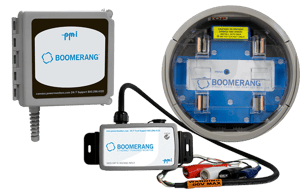
# Boomerang Setup Guide & Resources
The Boomerang family extends your SCADA system anywhere — from a 120V receptacle to a pole-mounted regulator. Find the manual, spec sheet, hookup diagrams, and everything you need to get your recorder online.
Need help? Support is available 24/7 at (800) 296-4120

Have a PQ question? Ask Merlin™—free.
Email or text us your toughest PQ questions and get answers backed by decades of PQ experience with Merlin™.
Standard messaging/data rates may apply.
[Email Merlin™](mailto:askmerlin@powermonitors.com?subject=PQ%20Question%20for%20Merlin) [Text Merlin™](sms:+15403833144)
QUICK START — 4 STEPS TO GET STARTED
[Product Manual](https://powermonitors.com/download/boomerang-manual/)
### [1 Mount & wire your unit Install the recorder and connect voltage and current per the hookup diagram for your model](https://powermonitors.com/download/eagle-and-revolution-hookup-diagram/?tmstv=1695303147)
### [2 Review specs & hookup Check ranges on the spec sheet and follow the hookup diagram for your wiring](https://powermonitors.com/download/boomerang-spec-sheet/)
### [3 Install & power up Mount and power the unit. Connect over the built-in cell modem, or Ethernet/PoE on the 3-phase model](https://powermonitors.com/download/boomerang-manual/)
4
### Configure SCADA & monitoring
Set DNP3 points and voltage thresholds, or view live data in a browser
## Documentation & Specs
4 resources
### [Product Manual Walks you through accessories, specifications, installation, operation, and more. Most downloaded Download PDF](https://powermonitors.com/download/boomerang-manual/)
### [Specification Sheet A quick summary of what the Boomerang can do across every form factor. Download PDF](https://powermonitors.com/download/boomerang-spec-sheet/)
### [Hookup Diagram Several wiring configurations for connecting your Boomerang in the field. Download PDF](https://powermonitors.com/download/eagle-and-revolution-hookup-diagram/?tmstv=1695303147)
### [Boomerang White Papers In-depth papers on CVR, DNP3 and the Boomerang point map, choosing a cell plan, and SCADA integration. Browse Papers](https://powermonitors.com/whitepapers/?whitepaper_search=Boomerang&whitepaper_topic=)
## Watch: PMI Video Library
Browse the full PMI video library for product walkthroughs, SCADA demos, and field setup tips that apply to the Boomerang and the rest of the PMI product family.
[View All Boomerang Videos](https://powermonitors.com/videos/?video_search=Boomerang&video_topic=)
## Software & Platforms
4 products
### [ Merlin™ — AI-Powered PQ Analysis in PQ Canvass Turn 5 hours of manual analysis into 15 minutes. Ask questions in plain English, get technically grounded answers about your recordings. Get Started](https://info.powermonitors.com/merlin-getting-started)
### [PQ Canvass Cloud platform for power quality data analysis. Integrates with Merlin™ for AI-powered insights. Learn More](https://powermonitors.com/product/pq-canvass-access/)
### [PMI View — iOS Mobile app for field configuration and data retrieval Learn More](https://powermonitors.com/product/pmi-view)
### [PMI View — Windows Desktop app for recorder management and data download Learn More](https://powermonitors.com/product/pmi-view-windows/)
### [ProVision Advanced data analysis and reporting software Learn More](https://powermonitors.com/product/provision/)
## Training & Education
Recommended
Whether you're new to power quality or a seasoned engineer, PMI offers training to help you get the most out of your equipment and deepen your expertise.
### [On-Site Training Free · Customized Free training at your location — covers PQ investigations, product usage, and best practices. Request Training](https://info.powermonitors.com/on-site-training-general-interest)
### [Live Webinars Free · Online Free online classes covering power quality topics and how-tos for PMI tools. New sessions added regularly. See Schedule](https://info.powermonitors.com/no-cost-class-schedule)
### [PQ Essentials Course 7 Sessions · PDH Eligible Seven 60-minute weekly webinars for engineers and technicians. Eligible for 7 PDH credits and 0.7 CEUs. Enroll Now](https://info.powermonitors.com/seven-sessions-class)
### [White Paper Library 400+ Papers In-depth research on power quality, SCADA systems, voltage regulation, CVR, harmonics, and more. Browse Library](https://powermonitors.com/whitepapers/)
## Frequently Asked Questions
How does the Boomerang communicate — cell, Ethernet, or both?
Most Boomerangs use a built-in LTE cell modem with an internal antenna, optimized for low-cost telemetry data plans. The 3-phase model also offers optional 10/100 Ethernet and PoE for wired sites. Contact PMI support for connectivity options and plan details.
How does the Boomerang connect to my SCADA system?
The Boomerang provides a full DNP3 interface over TCP or UDP cellular, with configurable voltage thresholds, unsolicited report-by-exception triggers, and polled modes. See the [Product Manual](https://powermonitors.com/download/boomerang-manual/) for the DNP3 point map.
Can the Boomerang be used for Conservation Voltage Reduction (CVR)?
Yes. The Boomerang is CVR-ready, with accurate voltage telemetry and triggering for Conservation Voltage Reduction systems. It's commonly used for regulator monitoring, capacitor bank measurements, and end-of-line monitoring.
What current ranges does the Boomerang support?
Ranges vary by form factor — the Form 2S handles up to 400A RMS total (200A per leg), while the 3-phase and pole mount units cover 20–200A with TLAR-S clamps or up to 5000A with FCTs, all at 1% current accuracy. See the [spec sheet](https://powermonitors.com/download/boomerang-spec-sheet/) for full measurement specs by model.
**Need more help?** Our Technical Support Team is available 24/7. Call [(800) 296-4120](tel:800-296-4120), visit the [Support Center](https://powermonitors.com/support/), or browse our [full training catalog](https://info.powermonitors.com/training).
[](https://powermonitors.com)
Power Monitors, Inc. is an industry-leading product design and manufacturing firm based in Mt. Crawford, Virginia. PMI® strives to solve power quality problems by listening to our customers and working with them to design and manufacture products. Total customer satisfaction is the primary goal of all PMI® staff.
[24/7 Tech Support **800.296.4120**](tel:18002964120)
#### Resources
- [White Papers](https://powermonitors.com/whitepapers/)
- [Videos](https://powermonitors.com/videos/)
- [Training](https://info.powermonitors.com/training)
- [Live Webinars](https://info.powermonitors.com/no-cost-class-schedule)
- [PQ Resources](https://info.powermonitors.com/power-quality-resources)
- [Support](https://powermonitors.com/support/)
#### Company
- [About Us](https://powermonitors.com/about-pmi/)
- [Contact](https://powermonitors.com/contact/)
- [Careers](https://info.powermonitors.com/join-pmi)
- [Newsletter](https://info.powermonitors.com/email-subscribe-page)
- [Terms & Conditions](https://powermonitors.com/terms-and-conditions/)
800 N Main St, Mt Crawford, VA 22841 | Toll Free [800.296.4120](tel:18002964120) | Fax 540.432.9430
© 2026 Power Monitors, Inc.